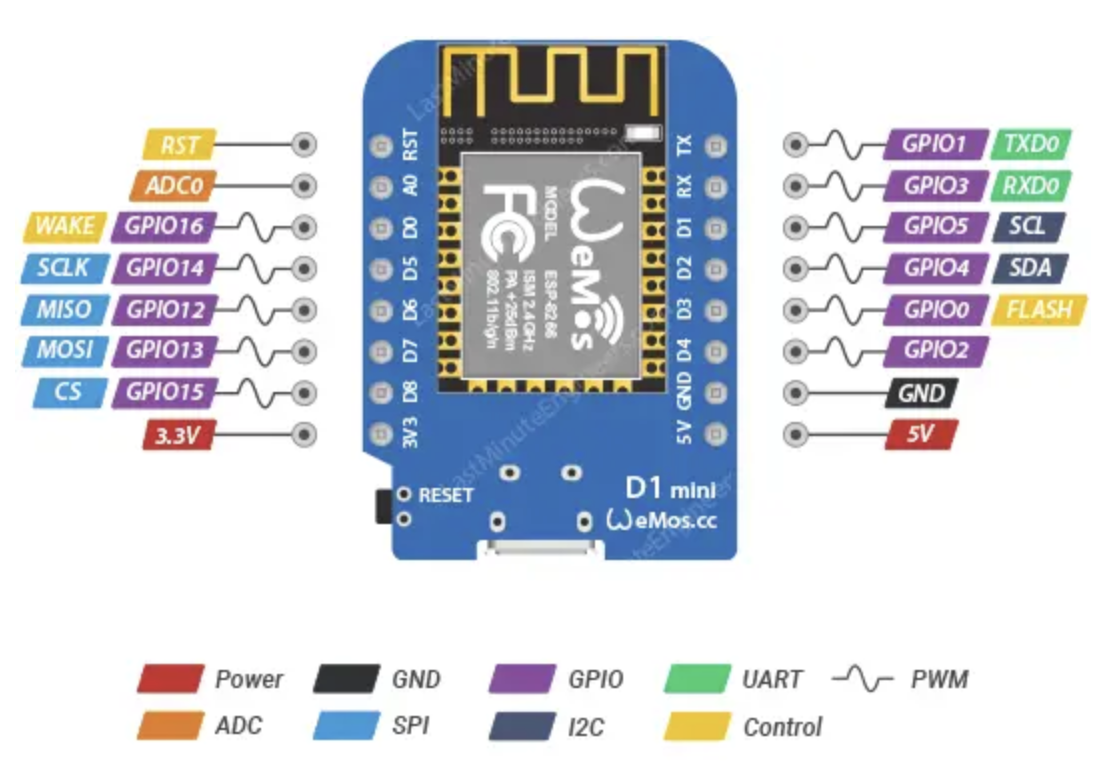
Complete guide to building web servers with ESP8266 D1 Mini
This exercise consists of three main parts that will take you from basic networking concepts to building a complete web server application with drag-and-drop functionality on the ESP8266 D1 Mini platform.
Once the Wi-Fi connection is established, the ESP8266 can: Respond to HTTP requests (GET/POST), Return HTML pages, Receive form data or AJAX calls, and Control I/O pins through the browser.
Add ESP8266 Board Manager URL
http://arduino.esp8266.com/stable/package_esp8266com_index.json
CSV is a simple file format where values are separated by commas. Example:
23,0.6,hello
Each value separated by a comma. First value: 23, second: 0.6, third: "hello"
JSON is a structured file format where data is represented as key-value pairs. Example:
{
"temperature": 23,
"humidity": 0.6,
"message": "hello"
}
JSON uses curly braces {} for objects and square brackets [] for arrays.
Watch the tutorial video (Duration: ~15-20 minutes):
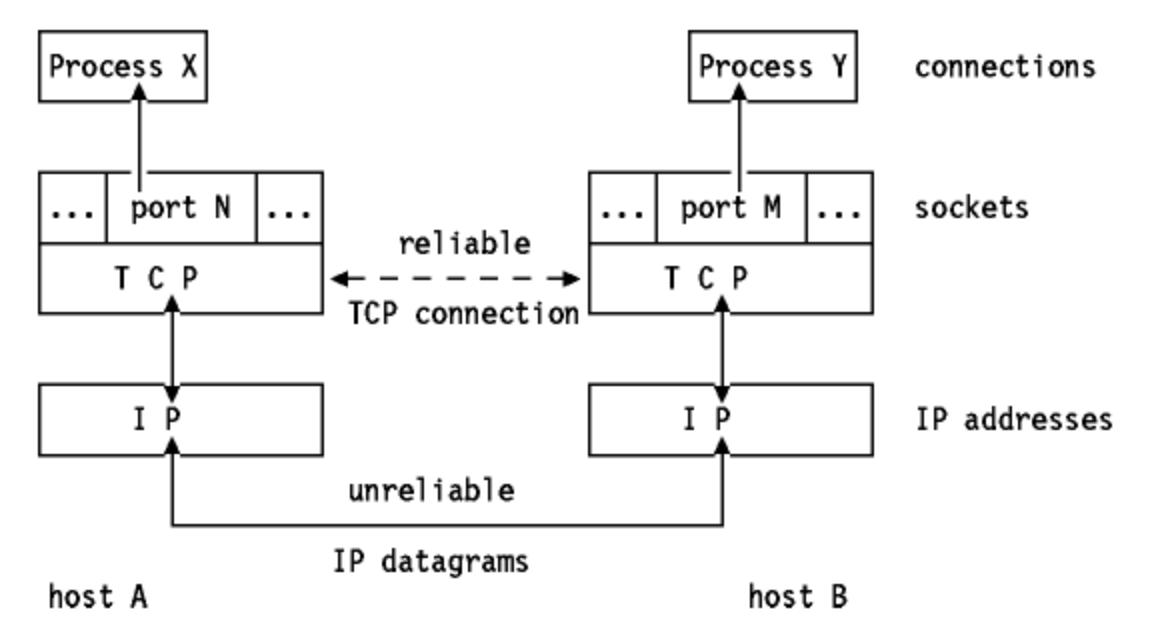
âķ Watch on YouTube (starts at 4:43)TCP/IP is the fundamental protocol that enables network communication. ESP8266 uses TCP/IP through Wi-Fi connection.
Step-by-step guide: What to ask AI when creating drag and drop functionality from scratch:
Additional elements for user interaction:
Radio Buttons = Only ONE can be selected (same name attribute)
Essential HTML concepts for building web interfaces:
What is a Modal?
A popup overlay that appears on top of the page, dims the background, and requires user interaction before closing.
Configure your ESP8266 robot:
What is a Card?
A container box with border, shadow, and padding that groups related information together.
Last update: 2 min ago
Ultrasonic sensor
Essential JavaScript concepts for interactive web pages:
Fires when element is clicked
Fires immediately as you type (every character)
Fires when selection changes (after losing focus)
Fires when mouse enters/leaves element
let speed = 50 stores current speedsendCommand(direction) processes button clicksonclick on buttons, oninput on speed fieldEssential CSS concepts to use when working with AI to create styled web pages:
This is hidden content that appears when you click the button above. You can put any HTML content here!
ðŊ Workshop Goal:
Learn how to build a drag-and-drop web interface for ESP8266 D1 Mini robot control - step by step!
How this workshop works: Follow the exercises below in order. Each part builds on the previous one. When you complete the workshop, test your knowledge with the ð Learning Checklist at the bottom of this page!
http://192.168.4.1GET /move?dir=F&speed=50:80, :443, :8080200 OK, 404 Not Found, 500 Error"MyWiFi""ESP_Robot"192.168.4.1192.168.1.1AA:BB:CC:DD:EE:FF<form><input type="number"><button onclick="send()"><select><option><div id="dropzone">data-cmd="F"onclick="move()"display: flex;gap: 10px;center, space-between#2196F32px solid #ccc8pxpadding: 10px 20px;margin: 10px;button:hover { }transition: all 0.3s;let speed = 50; const MAX = 100;function sendCommand(dir) { }addEventListener('click', ...)document.getElementById('btn')querySelector('.button')onclick="sendCommand('F')"oninput="updateSpeed()"console.log('Speed:', speed)<div draggable="true">ondragstart="handleDragStart(event)"ondragover="allowDrop(event)"ondrop="handleDrop(event)"e.dataTransfer.setData('text', id)e.dataTransfer.effectAllowed = 'copy'const copy = elem.cloneNode(true)insertAdjacentElement('beforebegin', elem)<div id="dropzone"><div class="spacer">elem.getBoundingClientRect().leftevent.clientXclassList.add('drag-over')cmds.join(',')querySelectorAll('.block')forEach(b => cmds.push(b.dataset.cmd))"F,L,R,B,S"encodeURIComponent(cmd)/run?commands=F,L,R&speed=50fetch('/move?dir=F').then(r => r.text()).catch(e => ...)elem.textContent = 'OK'~4MB on ESP8266const char html[] PROGMEM = "..."const char* page = htmlPage;<style>...</style>~80KB available/upload?code=...server.arg("commands")F=Forward, L=Leftserver.send(200, "text/plain", "OK")EEPROM.write(addr, value)[User / Web Browser]
|
| 1. Drag-and-Drop blocks
| (UI selects sequence of commands)
|
v
[HTML/JS on ESP8266 ROM]
|
| 2. User clicks "RUN"
| â JS collects block IDs
| â Creates URL: /run?commands=FBLRO&collision=...
|
v
[ESP8266 WebServer]
|
| 3. GET Request received
| - handleRun()
| - Stores commands in normalCommands / collisionCommands
|
v
[Loop Function]
|
| 4a. Collision avoidance check
| - measureDistance()
| - If obstacle < 20cm â collisionAvoiding = true
|
| 4b. Execute commands
| - normalCommands or collisionCommands
| - runCommand(cmd):
| F â forward()
| B â backward()
| L â left()
| R â right()
| O â ledOn()
| N â ledOff()
| J â delay(1000)
|
v
[Servo Motors / LED]
|
| 5a. Move robot
| 5b. Turn LED on/off
|
v
[Ultrasonic Sensor]
|
| 6. Measures distance
| - Triggers collisionAvoiding if <20cm
|
v
[ESP8266 Loop]
|
| 7. Updates next command or resets index
| 8. Optionally send feedback back to UI (GET Message display)
|
âââ> [HTML/JS updates GET Message Display]
Step-by-step guide: What to ask AI when implementing persistent storage with EEPROM:
EEPROM = Electrically Erasable Programmable Read-Only Memory
EEPROM is non-volatile memory - data persists even when power is removed or the processor resets. This makes it perfect for storing configuration settings, WiFi credentials, and user preferences that need to survive reboots.
EEPROM Emulation: Many modern microcontrollers (including ESP8266) don't have dedicated EEPROM hardware. Instead, they use Flash program memory to emulate EEPROM functionality. The compiler needs to be told to use emulated EEPROM instead of real EEPROM hardware.
Important Difference: Emulated EEPROM (Flash-based) typically has different write limitations than true EEPROM. Flash memory usually allows 10,000-100,000 write cycles, while true EEPROM might be limited to exactly 10,000 cycles. However, the same best practices apply: minimize writes to extend memory lifespan.
Write Limit: ~10,000 write cycles per memory location (real EEPROM) or ~10,000-100,000 cycles (Flash-emulated)
Read Limit: Unlimited (infinite reads are safe - no wear from reading)
Best Practice: Only write when settings actually change, never in loop()
Memory Type: Non-volatile (data survives power loss/reset)
Note: Even with Flash emulation's higher write limits, treating all EEPROM writes as precious is the safest approach for long device lifespan.
Understanding the three main memory types in microcontrollers and how they work together:
Speed: Registers (fastest) > RAM (fast) > ROM/Flash (slow)
Size: Registers (smallest, ~32 bytes) < RAM (KB) < ROM/Flash (MB)
Volatility: Registers & RAM = volatile (lost on power-off), ROM/Flash = non-volatile (persists)
Cost: Registers (most expensive per byte) > RAM > ROM/Flash (cheapest)